Japan Work Entry Guide (COE)

Certificate of Eligibility (COE) · Visit Japan Web QR · Disembarkation Card (for workers)
[Important] Present your Certificate of Eligibility (COE) at immigration. If it was issued electronically, just show the email on your phone (a forwarded email is fine). If you received a paper certificate, present that. Keep your passport, COE and employment contract in your carry-on — never in checked baggage.
日本語JA 한국어KO EnglishEN 简体ZH 繁體TW Tiếng ViệtVI IndonesiaID नेपालीNE
Visit Japan Web QR Code

Visit Japan Web lets you complete Japan entry procedures online in advance. You can obtain QR codes for immigration and customs beforehand.

If you have no QR code, fill out a paper Disembarkation Card. Only one of the two is needed.

Step 1: Create an account

Go to the official Visit Japan Web site and create an account with your email address. Click the link in the verification email.

Visit Japan Web

Step 2: Enter personal information

Enter your passport details (name, date of birth, nationality, passport number).

Step 3: Register your planned entry

Enter your arrival date, flight number, and the name of where you will stay (your company or dormitory).

Step 4: Get the QR code

Enter immigration and customs information and generate the QR code. Save a screenshot.

Always save the QR code as a screenshot. Airport Wi-Fi and roaming can be unstable and the screen may not open.
Disembarkation Card Guide

If you have no Visit Japan Web QR code, fill out the Disembarkation Card.
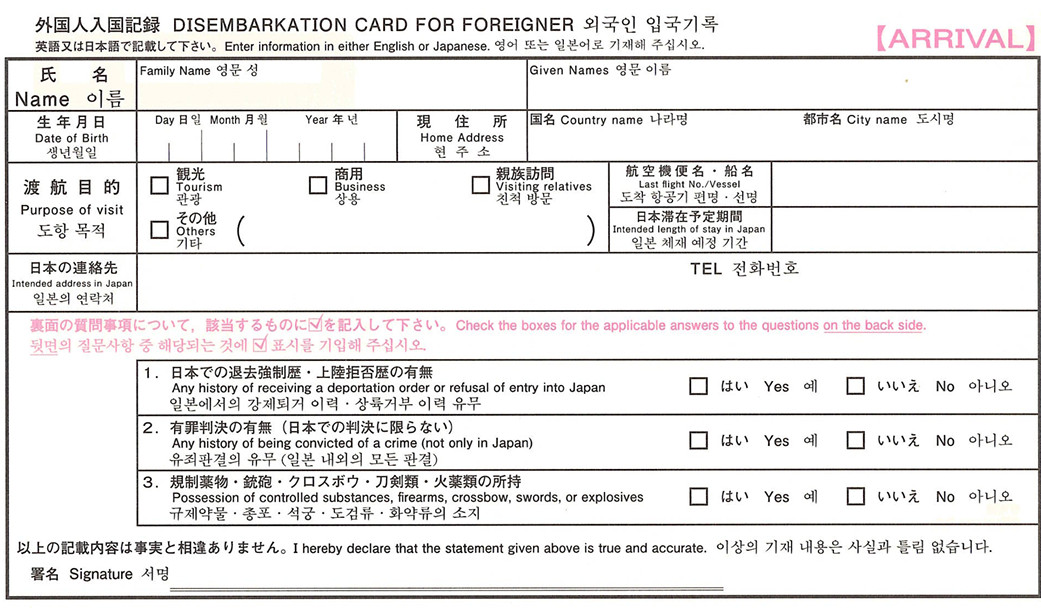
👇 Scroll to highlight each field on the card
Disembarkation Card
Example
Family NameFull name (as on passport, capital letters)
SANTOS
MARIA
Date of BirthDate of birth
05 / 11 / 1996
CountryCountry
PHILIPPINES
CityCity
Manila
PurposePurpose of visit
Tourism
Business
Visiting relatives
Others (*)
Flight No.Flight number
PR410
Intended period
1 Year
Intended address in JapanIntended address in Japan
ABC Co., Ltd.
TELPhone number
092-123-4567
1. Deportation or refusal of entry to Japan
Yes No
2. Criminal convictions (including in Japan)
Yes No
3. Possession of narcotics, firearms, swords, explosives
Yes No
SignatureSignature
Maria Santos
Use a non-erasable ballpoint pen (black or blue). No correction tape. If you make a mistake, cross it out with a double line and rewrite.
Notes
  • 1 Write in English exactly as on your passport
  • 2 Date of birth: day / month / year order
  • 3 Intended address in Japan: write your company name or dormitory address in English
  • 4 Purpose: tick "Others" and write your residence status name (see below)
  • 5 Check "No" for all three questions (normally)
  • 6 Your usual signature is fine
What to write in the ( ) after "Others"

Tick "Others" for Purpose of visit and write your own residence status in the brackets, in English. Write the status name — not the word "work".

Purpose of visit   ☑ Others ( ___________________ )
技能実習 Technical Intern Training
特定技能 Specified Skilled WorkerorSSW
留学 Student
技術・人文知識・国際業務 Engineer / Specialist in Humanities / International Services

Your status is printed on your Certificate of Eligibility (COE). If you are unsure, ask your employer or school.

How to write the intended length of stay

Write the period shown on your COE (Certificate of Eligibility). It is usually 1 Year or 1 Year 3 Months. Match it to the period on the Residence Card you receive.

1 Year 1 Year 3 Months
After arriving at the airport
1

Show QR code / Disembarkation Card

At the immigration counter, show your QR code or Disembarkation Card together with your passport and Certificate of Eligibility (COE).

2

Immigration check

Fingerprint scan and face photo. At 10 airports (New Chitose, Sendai, Narita, Haneda, Chubu, Kansai, Kobe, Hiroshima, Fukuoka, Naha) your Residence Card is issued on the spot. If you enter through any other airport or seaport, your passport is marked "Residence Card to be issued later" and the card is issued after you register your address at the city/ward office (normally mailed to that address).

3

Baggage claim

Collect your checked baggage at the carousel.

4

Customs declaration

With a QR code, use the electronic gate. Without one, submit a customs declaration form.

Do students need a COE?

Yes. "Student" is covered by the Certificate of Eligibility (only "Temporary Visitor" and "Permanent Resident" are excluded). In most cases the school you will attend applies on your behalf. Processing normally takes 1 to 3 months, so start early. The period of stay for "Student" is decided individually and cannot exceed 4 years and 3 months.

📄Certificate of Eligibility — official proceduremoj.go.jp ↗
To work part-time — Permission to Engage in Activity Other Than That Permitted
If your status is not primarily for work (for example "Student"), you need this permission before doing any part-time job. Working without it can lead to revocation of your status or deportation.
Documents For blanket permission, the application form only. No extra documents as a rule.
Fee Free of charge.
Where The regional immigration office for your address. However, on first entry you can apply at the airport.
Airport eligibility If you newly received landing permission with the status "Student", "Instructor", "Engineer / Specialist in Humanities / International Services" or "Skilled Labor" — except when your period of stay was set to "3 months".
Hours allowed Up to 28 hours per week. Up to 8 hours per day during your school's long vacation periods.
💡 If your Residence Card is issued at the airport, apply for this permission at the same counter. Otherwise you must visit the regional immigration office later.
🛬 [For the airport] Application form — students on first entry Only nationality, date of birth, name, sex and your signature. EXCEL ↗ 📝[After entry — immigration office] Application formPDF ↗ 📝[After entry — immigration office] Application formEXCEL ↗ ✏️Filled example (student, 20 h/week at a restaurant)PDF ↗ 📄Procedure guidancemoj.go.jp ↗ 🎓For "Student" statusmoj.go.jp ↗

Source: Immigration Services Agency of Japan · moj.go.jp

Visit Japan Web FAQ
1 Do babies need one too?
Yes. Every person needs their own QR code.
2 Can I just register them as accompanying family?
No. Registering as accompanying family only generates a QR code for the main registrant. You must select each family member by name and complete the QR generation process individually.
3 Is a screenshot OK instead of printing?
Yes, screenshots are actually recommended. Airport Wi-Fi and roaming can be unreliable, and the page may not load.
4 When should I create the QR code?
Before arriving in Japan. After arrival, filling out the paper Disembarkation Card is faster.
5 If I have a QR code, do I still need the Disembarkation Card?
No. You only need one or the other. Prepare the QR code in advance if possible.
6 What if the QR code was generated with wrong info?
You can edit it, but if you can't connect to Wi-Fi, filling out a Disembarkation Card is faster.
Disembarkation Card FAQ
1 Where can I get one?
Usually available at the immigration area after arriving in Japan. They are rarely distributed on the plane these days.
2 What language should I write in?
Write in English or Japanese, except for the signature.
3 What do I write for "Intended address in Japan"?
Write your company name or dormitory address (as stated in your accepting organization / supervising body documents) in English — not your own phone number.
4 Can I decide where to live after arriving?
No. Your accommodation is arranged in advance by your accepting organization / supervising body. Write that address.
5 What do I write for "Intended period of stay"?
Write the period of your Certificate of Eligibility (COE) / residence status (e.g. 1 year for Technical Intern Training (i)). Match it to the period on the Residence Card you will be issued.
6 Which documents must I keep in my carry-on?
Your passport, your Certificate of Eligibility (COE), and a copy of your employment contract. For the COE, bring the paper certificate if you were given one, or the email (screen or printout) if it was issued electronically. Keep them in your carry-on, not checked baggage.
7 Any documents besides the Disembarkation Card?
You must fill out a Customs Declaration form. It is available between baggage claim and the exit.
8 What pen should I use?
Use a non-erasable ballpoint pen (black or blue only). No correction tape. If you make a mistake, cross it out and rewrite.
← Back to list
Join the ATRENS Community
Ask people from your country, and read housing, job and daily-life info in your own language.
Sign up free
Already have an account? Log in